If you have OLED TV aspirations but an in- this -economy bank balance, good news: Roku just entered the chat with its first-ever OLED, and it starts at a reasonable $1,000—not counting inevitable future discounts, like the recent October Prime Day deal that lopped off $300. Of course, price rarely tells the full television story, like whether a budget OLED can stand up to, say, a high-end QLED or midrange mini-LED.
Here’s the story: The Roku Pro Series OLED is a very good TV, better than its price tag would suggest, though not without a few compromises. Colors dazzle, black levels go deep, and Roku’s software continues to yield the best user experience. It’s not blazingly bright, and your size options are few (55 or 65 inches), but on the whole this should please anyone making a move from an older, lesser screen.
Although Roku provides only a small printed quick-start guide, there’s nothing complicated about setting up this TV. The two tool-free feet attach with large thumbscrews and can be set at two different heights—great if you want to, say, raise the screen a bit higher so your soundbar doesn’t block it.
From there, Roku’s friendly UI walks you through the usual configuration steps, many of which you can complete on your phone (as opposed to navigating onscreen menus with the remote, always a slower process).
Four well-marked HDMI ports reside on the left side of the Roku Pro Series, set close enough to the edge that they’re easy to reach. The top one, clearly labeled “eARC,” is painted with Roku’s trademark purple for quick at-a-glance identification, while the bottom two—120-Hz ports intended for gaming—are white. (Why two? It’s a bit unusual, yes, but splendid for those who operate more than one console.) The TV also supplies the usual coaxial input for a traditional cable or antenna hookup, an optical audio input for older soundbars and an Ethernet port if you want to bypass Wi-Fi.
Speaking of which, it’s a bit disappointing that Roku opted for Wi-Fi 5 here instead of Wi-Fi 6 or later. That said, my Eero Pro router also tops out at Wi-Fi 5, and it’s likely the same situation in plenty of other households. I encountered zero issues in terms of connection reliability, stability, or performance.
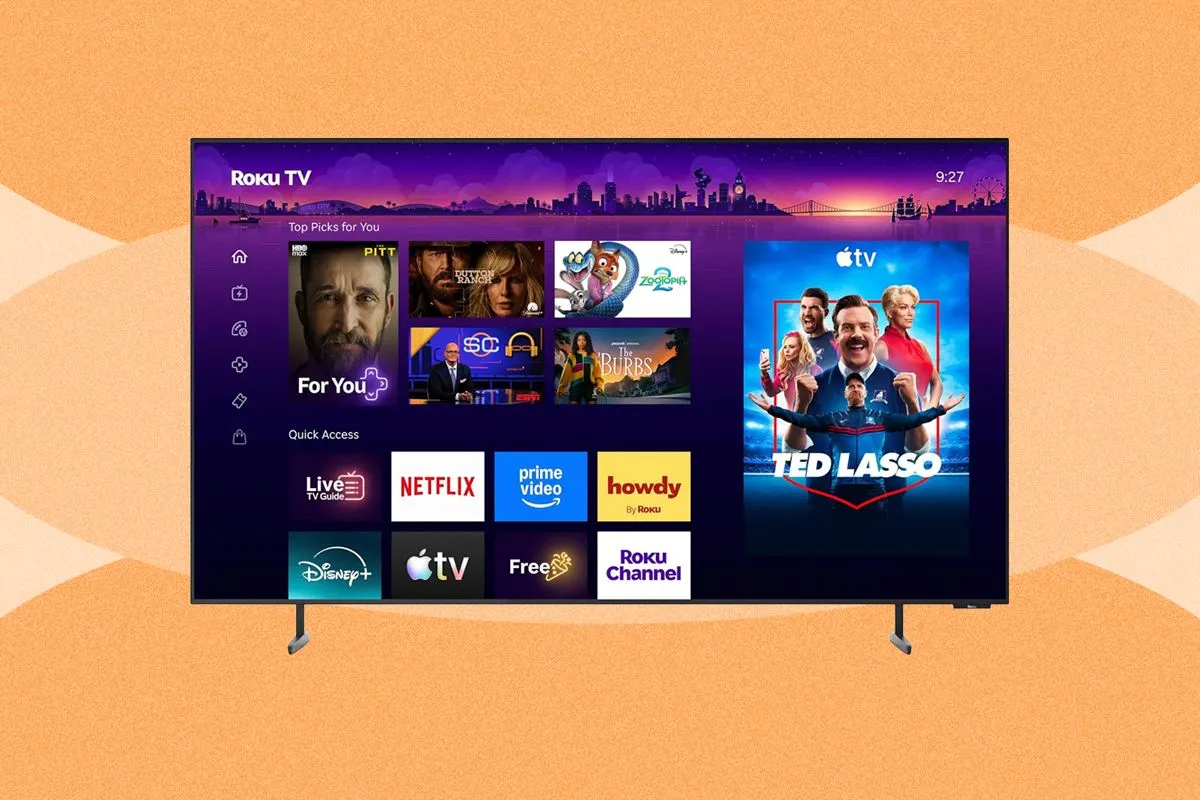
The Roku operating system continues to offer the most intuitive and novice-friendly TV viewing experience, marked by its colorful, oversize app icons and simple menus. There’s a bit more UI customization available now than in Rokus past, like the option to display icons in four columns instead of three. And there’s a sense of whimsy here not found elsewhere, including the lively “Roku City” screensaver that appears when the TV is idle. You can also opt for Roku Backdrops, an art-themed screensaver that does a solid Samsung The Frame impression.
Ads do crop up in various places—nearly a third of the home screen, a banner at the bottom of the menu screen, etc.—but they’re mostly streaming-related, not obnoxiously product-oriented like in Amazon’s and Google’s UIs.
One small gripe: There are still some streaming apps—HBO Max, Paramount+, etc.—that don’t let you sign into your account via app or QR code, even though their Google TV counterparts do. So be prepared for the occasional hassle of having to manually navigate onscreen keyboards with the remote.
Thankfully, Roku’s remote still rocks, with a cheerful purple navigation pad, dedicated play/pause and shuttle buttons, a programmable shortcut button, and side-mounted volume and mute controls. It’s more comfortable and intuitive than most remotes and is backlit. Unfortunately, it’s not rechargeable, an annoying oversight for a “Pro Series” TV. And its push-to-talk voice controls are fine for the likes of basic searches and playback functions but are constrained to Roku’s UI; you don’t get the added “smarts” afforded by Alexa+ and Google Assistant. (The exception: Roku’s branded smart-home gear, such as security cameras and light bulbs, can be controlled via voice commands.)
At least if the remote goes missing in the couch cushions (or an entirely different room, which is where I tried it), a handy remote-finder button on the right side of the TV will trigger “Here I am!” beeps.
To test the Roku Pro Series, I watched a wide range of sports, movies, and TV shows and fired up my Xbox Series X. As with other budget OLEDs, the colors impress; the brightness, not so much.
I started by streaming Solo: A Star Wars Story on Disney+. The first five minutes take place in the dark (literally and figuratively) underbelly of Corellia, and I’ve found that many TVs struggle here with contrast and brightness; several of these early scenes can look muddy or just plain dim. Roku’s OLED fared well on the contrast front, but I found myself wishing for a bit more visibility when Han lays out his plan to Kira and, later, confronts Lady Proxima. Even watching in a relatively dark room, those moments revealed suboptimal brightness.
Next up, the white-hallway scene in Mythic Quest , season 3, episode 1—a great measure of both contrast and black levels. Ian Grimm’s shirt appeared dark as night and juxtaposed perfectly against the smooth white walls. And within those walls, different shades appeared in different areas as the characters walked around; the TV expertly contrasted all of them. Did I find myself wishing for slightly whiter whites? Yes. Did I enjoy the scene any less? No.
While I had the Apple TV app running, I tuned into some live MLB soccer. The action: sharp and smooth (and dull, obviously, because soccer), and the same was true when I switched over to an NFL game on DirecTV. That’s as expected with a 120-Hz refresh rate.
Speaking of which, that rate, coupled with low-latency game mode (which kicked on automatically) served my Xbox experiences well. From the 1930s palette of the cartoonish Cuphead to the candy-colored arcade racing of Burnout: Paradise , everything looked crisp and vivid, with fast response times and zero blur.
For my color investigations, I clicked into Planet Earth II on HBO Max, Pixar’s Coco on Disney+, various “8K” nature videos on YouTube, and an Inglorious Basterds 4K Blu-ray played on the Xbox. Across the board, the Roku Pro Series produced vibrant, richly detailed color—but with less of the “pop” I’ve witnessed on high-end LG and Sony OLEDs. That’s partially due to the panel’s limited brightness.
Whether that’s a bad thing is open for debate; some would argue that higher-end OLEDs oversaturate, the shiny colors more of a distraction than an enhancement. Discuss.
A notable Roku innovation is Smart Picture Max, which automatically detects the type of content you’re watching and adjusts various display settings accordingly. Though it’s hard to gauge the impact of this on things like color and brightness, there’s one clearly quantifiable benefit: motion-smoothing. Smart Picture Max disables it for most TV shows and movies, meaning you don’t get the dreaded soap-opera effect. That alone gives the Pro Series a leg up over most OLEDs, which require manual tinkering to disable this heinous feature (and again to re-enable it for sports and gaming, the only situations in which it’s not heinous).
The one catch here is that any Dolby Vision content overrides Smart Picture Max, leaving motion-smoothing switched on. Fortunately, Roku makes it refreshingly easy to modify that and other picture settings; just press the star button on the remote. I found (and toggled off) smoothing with just a few clicks. Another nice perk: Any change you make applies instantly to whatever you’re viewing, so you can immediately gauge whether it’s what you want; you don’t have to exit the menu to see the results.
On the audio front, the presence of Dolby Atmos does nothing to improve the TV’s speakers, which produce plenty of volume but get harsh and shrill the higher you go. Indeed, the opening measures of Nick Perito’s “The Green Leaves of Summer” in Inglorious Basterds were deeply unpleasant, even at a modest volume. This came as something of a surprise, as Roku’s previous Pro Series TV sounded much better overall. The speakers here are tolerable at low volumes in a small room; for everything else, you’re going to want a soundbar.
In the end, Roku’s first OLED won’t win over any die-hard fans of premium panels; it’s a budget model through and through, probably on par with LG’s similarly affordable B6. But it’s still an OLED, with all the vivid color, pitch-black black, and strong contrast that technology affords. And the Roku remote, interface, and automated image adjustments contribute to a splendid user experience. Watch for the next sale (Black Friday, anyone?) and you’ll feel like you’re getting a steal.