It's a little hard to review the iPhone Duo. I've been toting Apple's first folding smartphone for the past week, and several apps I've tried to open on the sprawling 7.6-inch screen look awful. Thick, black bars on the sides, with a phone-sized app in the middle of this tablet-like display. But you likely won't encounter this problem once the Duo is in your hands.
In the past day, a handful of apps I use regularly updated to add full support for the iPhone Duo's screen sizes and vertical user interface elements. Instagram, Threads, Slack, and even the Google app now have navigational icons on the right rail instead of the bottom center, and the app content is better laid out to make use of the larger screen.
Developers need to target the iOS 27.1 software development kit (SDK) for full Duo compatibility. That will take some time. But it is a little maddening that some app developers, who for years have never seemed to care about optimizing their app for Android folding phones , are so quick to embrace Apple’s fold. Slack, for example, never offered the two-pane view of its desktop app in the Android version, but it's on the Duo. C’est la vie. Hopefully, Apple’s entry into foldables will result in a “rising tide lifts all boats” situation and Android fold lovers will get to enjoy those optimizations.
The iPhone Duo arrives seven years after Samsung’s first Galaxy Fold . In Apple tradition, its first entry into an existing category feels fully mature; the Duo has significantly less jank than the first few generations of its Android counterparts . The infamous crease—where the phone folds—is hardly visible thanks to Apple’s display stack and clever use of a matte-finish nanotexture screen. The phone is IP68 dust- and water-resistant (though avoid taking the Duo to the beach, as sand is notoriously detrimental to phone hinges). The software experience, barring the unoptimized apps, feels carefully considered.
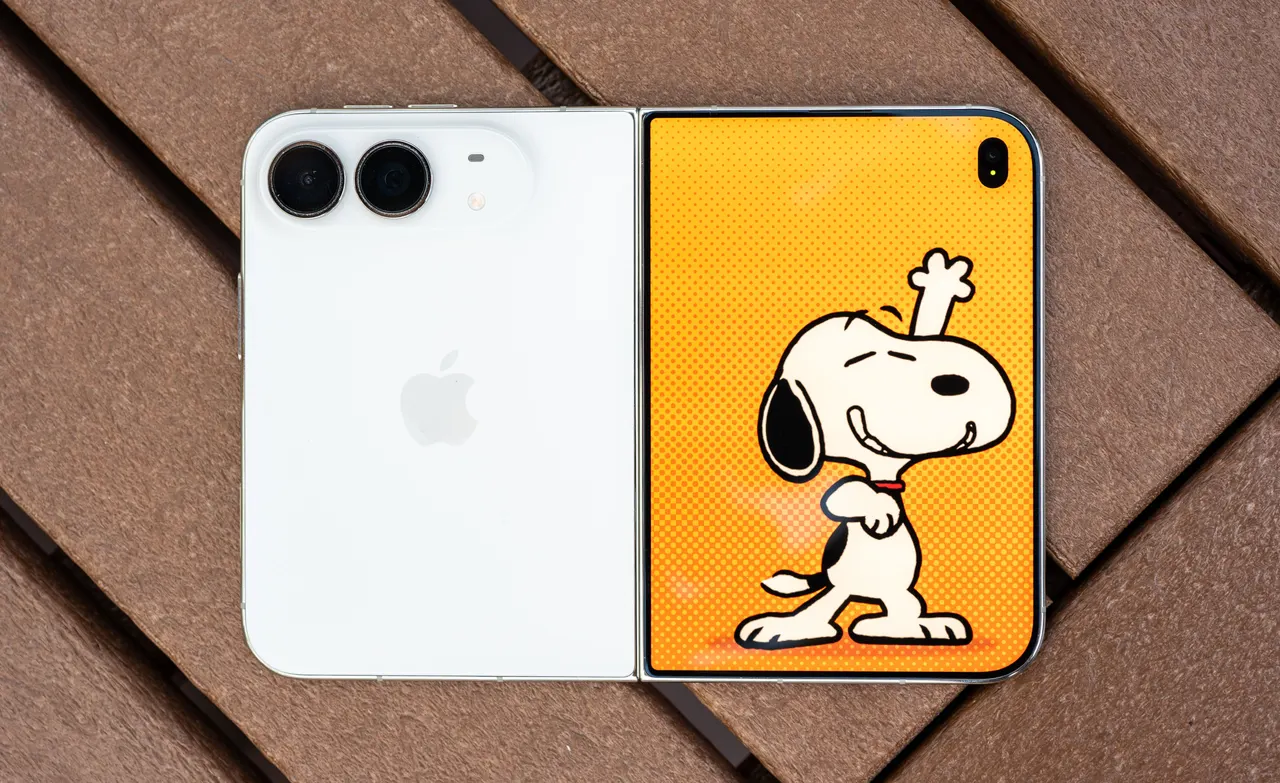
Apple has also landed on the right shape, months after Samsung realized it following seven years of narrow, somewhat awkward book-like folds . The wider, shorter “passport” design feels better than what’s come before in this category. The 5.4-inch outer screen is still big enough to be useful, and the hinge glides open gracefully and stays put at various angles. The hardware feels polished.
That’s not to say Apple has completely trounced the competition. I still appreciate that Samsung’s new Galaxy Z Fold8 is super lightweight at 201 grams, as the iPhone Duo’s hefty 254 grams (heavier than an iPhone 18 Pro Max ) can get tiring after extended doomscrolling. I don’t love the fact that, when closed, one side of the Duo has angled corners and the other is curved—the Fold8 looks better in that regard. Touch ID also takes a little getting used to after years of relying on Face ID, mostly when you’re holding the Duo with your left hand and you suddenly have to authenticate an app or purchase with your right hand. (It can mercifully auto-unlock if you're wearing an Apple Watch .)
Apple also tightly controls the multitasking experience. If you have two apps split-screen on the Duo, Apple won't let you resize one app to be slightly bigger than the other like you can on Android. Here, a 50-50 split is always enforced. You can't add a floating third app when in split-screen either, even though Apple has offered a similar capability on iPads for years. (The exception is video apps—you can have them float in picture-in-picture mode.) In portrait orientation, you can split-screen only with a video app; Apple won’t let you stack two apps, something Android has enabled for years.
That rigid software philosophy extends to basic input handling, too. I am typing this review on the iPhone Duo using a compact folding keyboard with a tiny attached trackpad. The trackpad works OK, but I could only get it to work after turning on AssistiveTouch in iOS’ accessibility settings. If the Duo is the iPhone that lets you do more, Apple should natively enable cursor support just like it does on iPads .
Then there are the physical quirks. The Duo supports MagSafe , so you can magnetically stick the phone to MagSafe tripods, mounts, and the like . (When it’s open, the Duo's weight makes the phone sag to one side.) But what about MagSafe wallets ? They’ll work, but Apple’s official wallet sticks out past the phone’s lower edge—not what you’d expect from a company that pores over every detail. Apple doesn’t have an official solution, so you’ll have to rely on a third-party accessory (and I suspect there will be many Duo accessories).
The iPhone maker follows the industry standard with a dual rear-camera system, lacking the third zoom camera from its Pro iPhones, which I sorely miss. At least the selfie cameras—the one on the outer screen and the “hidden” under-display inner camera seem to produce good results. On a Zoom call, my editor remarked that the video quality looked “really good” with both selfie shooters. (Zoom, by the way, wasn't optimized.)
When an app is properly optimized, the experience is chef’s kiss . Multi-pane views let you see a lot more in an app than candy-bar phones, a boost to productivity. Split-screening two optimized apps looks excellent, with plenty of room for each app to breathe and let you multitask. I haven’t found myself putting the Duo in angled positions much, mostly because I’ve really enjoyed using it with Apple’s Folio With Kickstand case, so much so that I wish the kickstand were integrated into the phone itself; I strongly recommend investing in an accessory to prop the Duo up.
Battery life has been pretty great. With average use, I’ve ended most days with around 40 percent left by bedtime. Right now, with over six hours of screen-on time because I’ve been working off the Duo for most of the workday, it’s almost 6 pm, and I’m at 45 percent. Impressive.
The dual rear cameras are reliable, too. You don’t get the fun variable-aperture wizardry of the iPhone 18 Pro’s camera, but after comparing photos I’ve captured on both devices, the results aren’t drastically different. That brings us to the features I think will help bring folding phones into mainstream appeal—Smart Take and Duo Preview.
The latter is a staple of folding phones, letting you show the camera’s viewfinder to the photo subject—good news for anyone who has ever complained about their Instagram husband. Now you can make sure they’re angling the camera just right before hitting the shutter button. You can also take better-quality selfies with the rear camera yourself— open the camera app on the larger screen and flip the phone; you’ll get an option to view the camera controls on the outer screen, letting you see a live preview while snapping with the superior 48-megapixel cameras.
Smart Take is similar to Google’s Magic Capture . Set the phone down in a partially folded shape (so it looks like a tiny laptop) and tap the shutter button. The camera will then wait for you to get into position and snap a series of photos when it thinks you’re posing. You can forget about asking someone to take a picture for you. It’s not as smart as the Pixel feature —I ended up deleting a bunch of awkward Smart Take photos—but it’s convenient.
I’m sure Kids Cue will be popular too. I don’t have a kid, so I couldn't vet how well it works, but it loops cute Snoopy animations on the outer display to capture a child's attention and make them smile. Google and Samsung have similar versions on their folding phones, but neither has Snoopy—a big win for Apple.
The nanotexture finish on the inner screen is the star of the show. The matte surface reduces the crease's visibility, while also minimizing glare and reflections. It also feels like e-paper, which I imagine will be very welcome when Apple Pencil support is added later this year (via a software update). Writing on a screen always feels better when the screen isn’t entirely smooth.
You don’t get the crisp video quality, deep blacks, and sharp contrast of the iPhone 18 Pro when watching movies and shows on apps like Netflix on the nanotexture panel. However, colors are still just as vibrant, and the experience is very similar. I didn’t have any issues with screen brightness—the Duo gets up to 3,000 nits at peak outdoor brightness—even with the textured finish, though off-axis viewing isn’t great in direct sunlight.
Much of my time this past week has been thinking about wasted space. Sometimes I questioned Apple’s decision to move all the navigation elements of iOS to the right rail—there’s so much wasted space in some apps! Then I use an app that uses all that space, and I’m content. That’s probably my takeaway. If you want to try Apple’s first folding phone, wait a few months for developers to optimize their apps. (It might actually help that the phone is backordered until January.) Waiting might help in other ways too—Apple plans to add Reachability later this year for the Duo, letting folks with small hands more easily access the left or right edges of the screen with a tap.
This is often the case with first-generation products, but it may be prudent to wait for the Duo 2—not because there are glaring issues here, but I suspect Apple may tackle the weight problem with the next version, just as Samsung did on its latest iteration.
Folding phones will never be for everyone. Some people do not care for the bigger screen. Others have durability concerns, and a device with more moving parts will never be as repairable or robust as its single-slab counterpart. Price is a barrier for others—but on that note, the Duo is surprisingly on par with its competitors (though still expensive).
But the folding category is here to stay. I know people who swear by the fold and won’t buy anything else. I’m starting to convert, especially with the newer passport-style shape. Now if only someone could figure out how to put a real zoom camera on there.